What this page does to each file
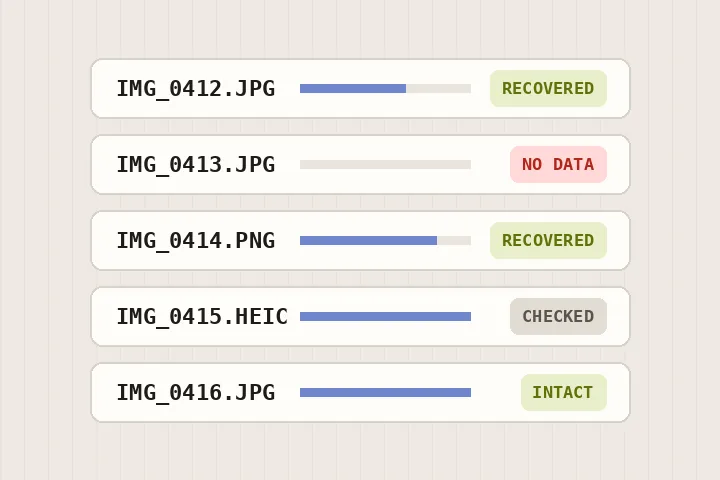
The first bytes of a file say what it is, whatever its name says. A JPEG goes to the marker walk, which reads the compressed picture until it stops being trustworthy: the end of the file, a long run of zero or FF bytes, or a marker that cannot appear there. Everything before that point is kept byte for byte and the end marker is appended. A PNG goes to the chunk walk, which checks every CRC and keeps the image data that arrived.
Every row is decoded once in your browser to count the rows of picture that survive, and the count is printed. A recovered file that decodes can be carried to the bench in the same tab, without saving it first.
When this is the wrong tool
- A card that will not mount, or files that are missing altogether, need card-level recovery software. This page works on files you can already see.
- Picture data that was overwritten or never written cannot be rebuilt from the bytes that remain.
- RAW camera files (CR2, NEF, ARW, DNG) are not read here.
Questions about corrupted photos
Can corrupted photos from an SD card be fixed?
Often partly. When a card or a copy fails part-way through writing a photo, the start of the file is usually intact and the end is missing or filled with zeros. For JPEG and PNG this page finds the last byte that can be trusted, keeps everything before it exactly as it was, and closes the file properly, so the part of the picture that was written opens again.
Why does my recovered photo still have a grey band at the bottom?
Because the rows below the band were never written to the file. A JPEG stores its picture from the top down; a file cut short has the top of the picture and nothing after. No tool can recover rows that are not in the file. If you open the recovered file on the bench, that band is left out of the mask, because it is missing picture, not damaged picture.
What does 'no picture data' mean?
Every byte of the file is zero, or every byte is FF. The card recorded the file's name and size but never wrote its contents. Nothing in the file can help; card-level recovery software, run on the card itself, sometimes finds the real data elsewhere.
Does it repair HEIC and WebP files?
It checks them: HEIC by walking its boxes, WebP by its RIFF length, GIF by its trailer byte, and then tries to decode each in your browser. Byte-true recovery is built for JPEG and PNG only, and the row says so rather than offering a re-encode dressed up as a repair.
Are my files uploaded?
No. Each file is read by this page in your browser, and the ZIP is assembled in memory on your device.
Related
- Repair a corrupted JPEGName the byte where it broke and save the surviving original bytes with an end marker, not a re-encode.
- Repair a PNG fileWalk every chunk, check every CRC, and keep the chunks that survive byte for byte.
- The half-grey JPEGWhat a cut-off JPEG loses, why the grey band is not damage, and what ten cut points in one file show.