What this page does to a JPEG
A JPEG is a compressed picture held between structural markers. This page walks those markers, then reads the compressed picture data until it stops being trustworthy: the end of the file, a run of zero or FF bytes where a card never wrote anything, or a marker that cannot appear inside picture data. When the stream carries restart markers, the cut moves back to the end of the last complete restart interval.
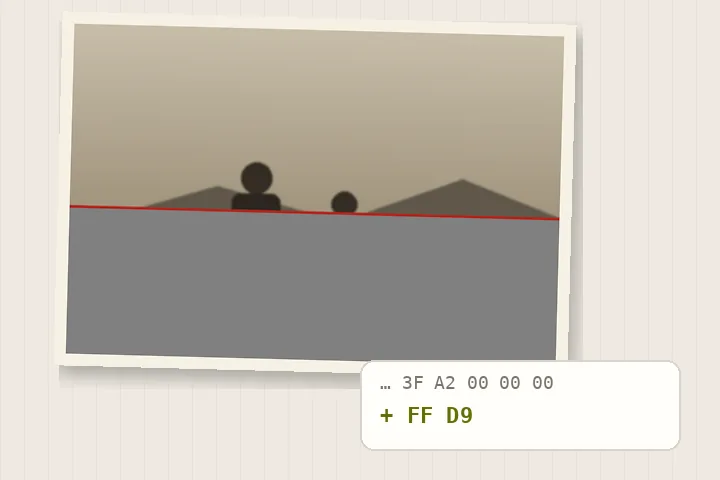
Everything before the cut is kept exactly as it was, and the end marker FF D9 is appended. The result is then decoded once in your browser to count the rows that survive, and the count is printed beside the save. Nothing is drawn onto a canvas and encoded again on the way to your disk.
Where this stops
- Picture data that was overwritten or never written cannot be reconstructed from the bytes that remain. The grey rows of a cut-off file stay grey.
- A recovered progressive JPEG keeps every complete scan; a scan that was cut off mid-way may leave the lower part of the picture coarser than the top.
- A file whose header is damaged before the picture data starts has nothing to recover from on this page.
- A re-encoded copy is offered only when the recovered bytes will not decode in this browser, and it is labelled as a re-encode.
- Keep the original damaged file. A forensic decoder may recover more of it than a browser can.
Questions about broken JPEGs
Why does my JPEG open half grey?
Because the file stops before the picture does. A JPEG stores its picture from the top down, so when a copy or a card write is cut short the rows at the bottom never arrived and a viewer paints them flat grey. Those rows are not damaged picture that can be repaired; they were never written. This page finds where the data stops, keeps everything before it byte for byte, and tells you how many rows decode.
Is the saved file re-encoded?
No. The saved file is the first part of your own file, unchanged, followed by the two-byte end marker FF D9. The headers, the quantisation and Huffman tables and the compressed picture data are the camera's own, so there is no second generation of JPEG loss and the metadata travels with it. Only if that recovered stream will not decode in your browser is a re-encoded copy offered, as a separate, labelled second option.
What is a restart marker and why does it matter?
Some cameras and scanners write RST markers into the picture data at regular intervals. Each one is a point where a decoder can start fresh. When a file carries them, this page cuts at the end of the last complete interval rather than at the last byte, so the recovered file never ends in a half-written block.
Can it get anything back if the main picture is badly damaged?
Often, yes. Cameras store a small thumbnail in the EXIF block, and many also store a larger preview in an MPF segment. Both sit near the start of the file and are complete JPEGs of their own. When either is present and whole, the page offers it separately with its size.
Does my photo get uploaded?
No. The file is read by this page in your browser. There is no server here that accepts files, and the recovery is plain arithmetic over the bytes in memory.
Repair the picture rather than its container
- Repair a PNG fileWalk every chunk, check every CRC, and keep the chunks that survive byte for byte.
- RepairImageDetection, an editable mask and the fill, on one column.
- Scratches and dustOpens with detection turned up and the brush already out.
- What restoration cannot bring backSilvering, mould, missing faces, and the honest end of the list.