Repair a PNG fileOpen a PNG that won’t open

Add a PNG that is cut off or says it is damaged. Save every part of the picture that survived.

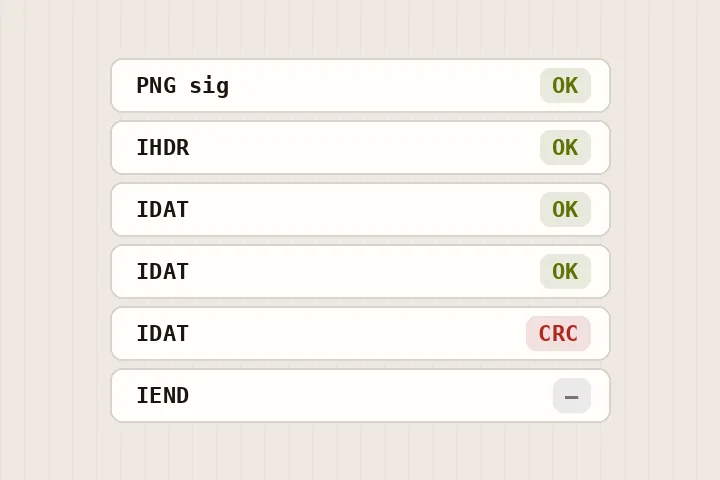
Drawing of a PNG's chunks checked one by one, one failing its checksum
Drawn: every chunk of a PNG checked
One PNG at a time. Drag it here, paste it, or press Enter to open the picker. The file is read in this tab and nothing is sent anywhere.
FreeNo sign-up

Every request this page can make

Your picture is opened from your device and repaired in this tab. None of these requests carries it. A row marked happened has been made in this tab since it opened.

RequestWhenCarries your picture?This tab
This site's pages, scripts, styles and fontsPage loadNo● happened
Cloudflare Web Analytics beacon (cookieless)Page load, on the live domain onlyNo○ not yet
HEIC decoder (this site)The first HEIC file you openNo○ not yet
TIFF reader (this site)The first TIFF file you openNo○ not yet
ONNX Runtime (this site)The first model pass you ask forNo○ not yet
Model files (our model file server)Only when you press a button that names their sizeNo○ not yet
Contact form (Google Forms)Only when you press Send on the contact pageNo; there is no way to attach a scan○ not yet

Check it yourself: open your browser’s network panel and repair a scan.

On the bench

Walk every chunk, check every CRC-32, and save the chunks that survive byte for byte with a correct end — the compressed picture data is never re-compressed.

Your file's own chunks, byte for byte, then a correct IEND. A cut-off final IDAT keeps every data byte that arrived, with its length and CRC rewritten. Bit depth, palette and colour profile are untouched.

Keep the damaged original either way.

What a chunk walk can tell you

A PNG is a sequence of typed chunks, each one carrying its own CRC-32 checksum. That makes the file unusually answerable: a checksum either agrees with the bytes in front of it or it does not, so this page can say with certainty which chunk changed after the file was written, and at which byte offset a chunk claims more data than the file contains. Everything in the findings table is measured from your file rather than guessed at.

The save keeps what survives and nothing else. Chunks that check out are copied as they are; the image data runs up to the last whole IDAT chunk, plus whatever arrived of the one after it; and a correct IEND is written at the end. The result is decoded once to count the rows that survive, and that count is printed beside the save.

What a checksum cannot repair

  • A failing CRC proves a chunk changed. It does not reveal what the original bytes were.
  • An IDAT chunk whose checksum fails is left out, with everything after it, because a decoder cannot know which of its bytes are wrong.
  • A cut-off final IDAT is kept to the last byte that arrived; it is not trimmed to a deflate block boundary, so a strict decoder may stop a few rows earlier than a browser does.
  • Animated PNGs are recovered as files, but the preview shows the single frame the browser exposes.
  • Orientation is not normalised on this route, because the diagnostic has to run on files the workbench's decoder would refuse outright.

Questions about broken PNGs

What does the saved PNG contain?
Your file's own chunks, byte for byte: the signature, the IHDR header, every chunk before the image data whose checksum agrees with its contents, and the IDAT image-data chunks up to the last one that is whole. If the final IDAT was cut off by the end of the file, every data byte that arrived is kept and only that chunk's length and checksum are rewritten to describe it. A correct IEND chunk closes the file.
Is anything re-compressed?
No. The compressed picture data is copied, not inflated and deflated again, so bit depth, palette, transparency and colour profile come through exactly as they were. A re-encoded copy is offered only when the recovered file will not decode in your browser, and it is labelled as a re-encode.
What does “Rewrite checksums only” do?
Some PNGs are whole but carry a CRC that disagrees with the chunk it protects — the checksum rotted, or a tool wrote the wrong one, and strict viewers refuse the file. This option keeps every chunk exactly as it is and replaces only the checksum fields that are wrong. It cannot tell you whether the data or the checksum was the part that changed, so keep the original.
Why is the bottom of my recovered PNG blank?
Because those rows were in the part of the file that never arrived. A PNG's image data is one compressed stream from the top row down; once it stops, there is nothing to decode beyond that point. The page counts the rows that decode and prints the figure.
Does the PNG get uploaded?
No. The file is read in your browser tab and every byte of the work happens there.

Other kinds of restoration

Photographic visual for Repair Png
Repair Png